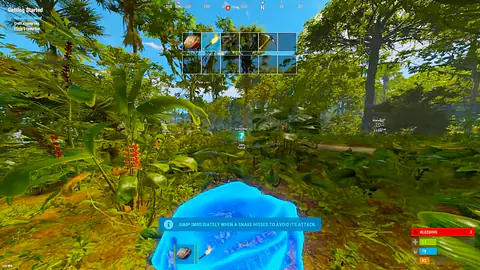
Jungle player ESP
Track threats through any terrain
RustCheats // Field system
Dominate every wipe and survive every encounter with undetected Rust cheats built for real sessions. Our aimbot, ESP, radar hacks and weapon scripts stay wipe-ready—from fresh beach spawn to end-game heli takes.
Profiles built for
Jungle player ESP
Track threats through any terrain
Skeleton ESP & aimbot
Bone reads with precision FOV lock
Player & loot ESP
See loadouts before the fight starts
Minimap & bow aimbot
Radar awareness with silent range
Aimbot FOV lock
Precision tracking with humanized control
Red silhouette ESP
High-contrast targets at any range
Loot & inventory ESP
Read every kit through cover
Field radar & player ESP
Own the open field before they peek
Undetected & Stream-Proof
Wipe-Ready Builds Updated Weekly
50,000+ Active Users
24/7 Support & Setup Help
Compare all three access tiers, from focused world awareness to configurable combat controls and limited private access.
Rust X-Ray
A streamlined Rust tier with visibility-aware targeting controls, configurable player and loot ESP, and cloud-ready profiles.
+10 more features
Rust Pro
A configurable Rust tier combining aim and trigger assistance with detailed player, threat, weapon, and gear overlay controls.
+21 more features
Rust Private
A limited-capacity Rust tier with comprehensive aimbot, Patrol Helicopter, ESP, radar, trigger, overlay, profile, and direct-support controls.
+55 more features
Explore every supported account workflow, cosmetic utility, virtualized service, and system tool in the catalog.
Recovery workflow
Rust UGC
Unban & Governance Control
A Rust and Steam account-recovery workflow builder for organizing account health checks, appeal preparation, identity-reset guidance, and recovery records.
+6 more features
Cosmetic utility
Rust Skin Changer
Local cosmetic preview controls
A Steam-focused Rust cosmetic utility for browsing weapon skins, outfits, armor, rare variants, and premium cosmetic combinations with quick local apply controls.
+11 more features
Single PC
Rust Cloud DMA
Single-PC virtual environment
A single-PC Rust environment built around an isolated Hyper-V virtual layer, automated setup, encrypted activation, and supported cheat-stack integration.
+7 more features
System utility
Rust HWID Spoofer
Rust and EAC identifier workflow
A Rust and Easy Anti-Cheat-focused Windows identifier utility covering configurable spoof profiles, cleanup, verification, and guided clean-slate workflows.
+11 more features
Aimbot, ESP, radar, weapon scripts, and utility features—built for real Rust sessions from beach spawn to heli take.
Our Rust aimbot delivers pixel-perfect tracking with humanized smoothing. Configure FOV, bone selection (head, chest, random), and prediction for moving targets. Silent aim options available for stealth gameplay.
Full ESP suite showing players, loot, nodes, stashes, vehicles, and animals through walls. Customizable colors, distance filters, and item rarity highlighting. Box ESP, skeleton ESP, and health bars included.
External radar displays all entities in real-time. See player positions, direction, and distance without looking away from your crosshair. Fully customizable zoom and filter settings.
Weapon-specific recoil patterns for AK, LR, MP5, Thompson, and every gun in Rust. Adjustable randomization to appear natural. Works with all attachments and scopes.
Spider/No Clip, speed hack, super jump, instant loot with filters, day/night control, and admin detection—everything you need beyond aim and ESP.
Undetected Guarantee
Our Rust cheats bypass Facepunch's anti-cheat and server-side detection. Regular updates keep you safe through every patch.
Wipe-Ready Builds
New Rust update? We're ready before you log in. Our dev team pushes builds within hours of any game update.
Humanized Technology
Smart randomization and behavioral mimicry make our cheats indistinguishable from skilled human play.
Performance Optimized
Zero FPS drops. Zero input lag. Play like it's native.
Five steps from verification to your first server. Follow in order for the fastest path to a working profile.
Step 01
Access
Complete verification and get instant download.
Step 02
Download
Get immediate access to our loader.
Step 03
Inject
Run with our undetected injector.
Step 04
Configure
Load presets or customize your settings.
Step 05
Dominate
Join any server and take control.
Check the current release notice before setup. Supported platforms can change after major game updates.
Each module is built around practical Rust sessions, with enough control to create a profile that feels deliberate instead of overwhelming.
Targeting that stays configurable
Control smoothing, field of view, bone selection and activation behavior from one focused profile.
Player information at a glance
Choose exactly which names, distances, held items and status details appear in your overlay.
Find what matters this wipe
Filter resources, crates and dropped items by category and distance to keep the screen readable.
Profiles for every loadout
Save weapon-specific recoil and sensitivity preferences, then switch profiles without rebuilding them.
A compact view of nearby movement
Use a minimal radar view with range controls, directional markers and optional team filtering.
Settings that travel with you
Back up named profiles, restore defaults quickly and keep separate setups for solo, duo or clan play.
Rust-specific write-ups on tiers, ESP discipline, patch-day checks, and wipe-ready configuration.
Compare Rust HWID Spoofer and Rust UGC for hardware bans vs account restrictions—workflows, limitations, and what neither product guarantees.
Compare Rust overlay ESP, aim assist, trigger assist, and full aimbot controls across Pro and Private tiers—with sensible configuration guidance.

Compare traditional Rust cheat tiers with Rust Cloud DMA—Hyper-V single-PC workflows, prerequisites, integration, and who each approach is for.
A straightforward path from choosing access to building a setup you can reuse throughout the wipe.
Check live status
Review the current build notice and supported Windows versions before purchasing.
Choose access
Pick a short pass or a longer plan based on how often you play each wipe.
Follow the setup guide
Download from your account portal and complete the guided setup in order.
Build your profile
Start from the default profile, test carefully and save settings by loadout.
Good setup should feel predictable: clear status, understandable defaults and help at the moment you need it.
Built around wipe day
Release notes and availability updates are posted before you download, so you can check the current build status first.
A clean default profile
Start with conservative settings, then change only the controls you understand instead of facing a wall of toggles.
Help where setup gets confusing
The setup guide covers installation, profiles and common troubleshooting, with Discord support for account issues.
Start with the FAQ below. For account, compatibility or setup questions, use Discord or email so the support team has the right context.
Build status, supported systems, licensing, and checkout details.